How I used a kanban board to buy my first home
- I built this board in 2014 to buy my first home, chain-free, in the UK — and made it public so anyone could copy it.
- Four lists: To Do → Doing → Done, plus a separate Properties you like list running alongside.
- The task board handles the process (solicitor, broker, removals). The property list handles the shortlist. They don’t get tangled.
- Still works in Trello today, over a decade later, because the process barely changes.
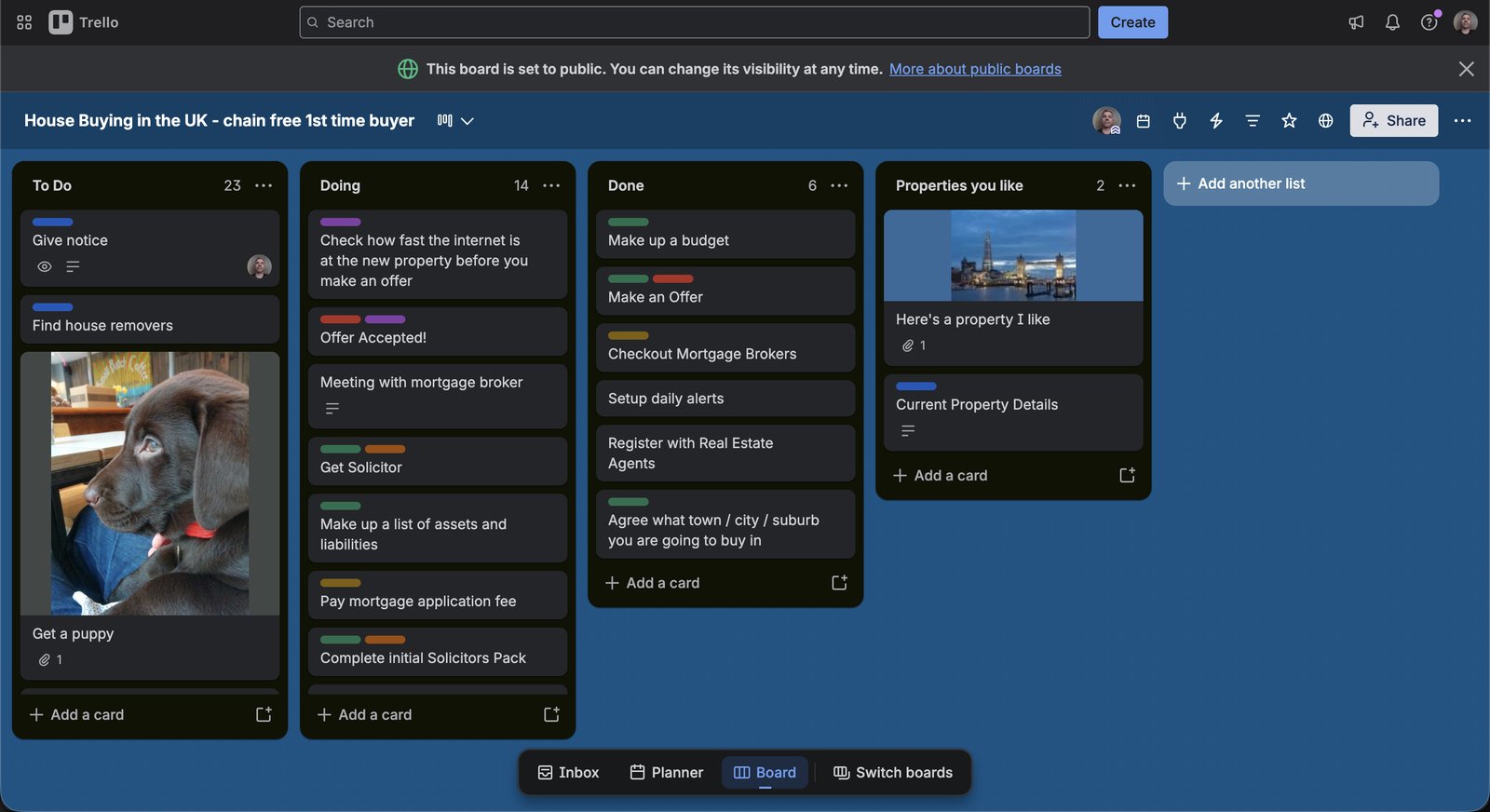
The actual board, still public today: “House Buying in the UK — chain free 1st time buyer.”
Back in 2014 I was buying my first home in the UK, chain-free, and trying to keep track of a process that touches a dozen different people at once: an estate agent, a mortgage broker, a solicitor, a removals company, and a seller who’s doing the exact same juggling act on their end. Nothing about it fits neatly in a to-do list, because half the tasks depend on someone else finishing theirs first.
So I built a Trello board called “House Buying in the UK — chain free 1st time buyer” and made it public. Not because I thought I’d invented anything clever, just because I’d have killed for a template when I started, and I couldn’t find one that wasn’t a generic project-management demo with no idea what a first home purchase actually involves.
The board
Three lists carry the actual process: To Do, Doing,Done. Every task in a home purchase becomes a card and moves left to right exactly once: give notice, find house removers, get a solicitor, make up a list of assets and liabilities, pay the mortgage application fee, complete the initial solicitors pack, check how fast the internet is before you make an offer. Nothing fancy, just visibility into what’s actually moving versus what’s been sitting untouched for two weeks.
The fourth list, Properties you like, is deliberately separate. It’s not a stage in the process, it’s “the shortlist” — the one, and it sits next to the process the whole time, the card holding a photo of the current property you’re buying. Keeping it apart from the task lists meant I had a card to keep track of documents and other info.
Sharing it publicly
Trello let me flip the board’s visibility to public with a link, so I did, and posted it wherever first-time buyers were asking what the process actually looked like. People copied it, stripped out the cards that didn’t apply to them, and used the shape of it: three process lists and one property list. A few told me they kept “Get a puppy” in their copy as a joke reminder that the whole thing is supposed to end somewhere nice, not just be a wall of admin.
Over a decade on, the board still holds up, mostly because the process hasn’t changed. Solicitors, brokers, removals, and a chain of people all waiting on each other — that part of buying a home in the UK is stubbornly the same. A kanban board doesn’t fix any of it, it just makes it visible, which turns out to be most of what you need.
If you want to copy and use this kanban, here you go →https://trello.com/b/LlJP8rWa/house-buying-in-the-uk-chain-free-1st-time-buyer
FAQs
What’s the fastest way to organise a first home purchase?
Use a kanban board with a To Do / Doing / Done structure for every task in the purchase (solicitor, mortgage broker, removals) plus a separate Properties you like list, so the process and the property shortlist don’t get tangled together.
Can I copy a Trello board for buying a house?
Yes. Trello supports copying a public board, including its lists and checklist cards, so you can duplicate someone else’s house-buying board and adapt the task list to your own purchase.